3 free ways to open Word documents without Office

By Nick Mead on 6 November, 2008

Yesterday my father rang me wanting some help with opening a Microsoft Word document. He didn't have Microsoft Office installed, there was no way he was going to pay up to $229 to buy it and to cap it all, he'd never even used a word processor before. I shuddered at the challenge that lay ahead of me but to my pleasant surprise, within 10 minutes I'd taught him how to open, edit, save and even send the document by e-mail - and all without having to have Microsoft Office or Word installed on his computer. If my dad can do it, anyone can and so here's 3 ways that you can do the same:

1. Google Docs

If you've received the document by e-mail, download it, go to Google Docs and upload it. Note that you'll need to sign-up for a Google Account first.
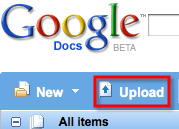
google-docs-upload.png

Simply browse to the file you want to upload and it will open automatically in Google Docs.
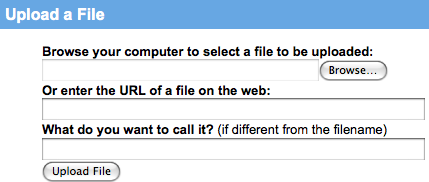
google-docs-upload-2.png

From there you can edit it in much the same way as you can in Word and send it by e-mail directly from your Gmail account.
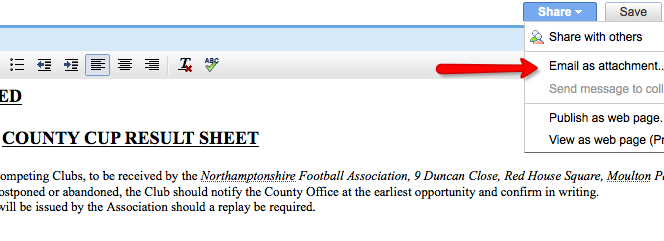
google-docs-3.png

2. Open Office

Download the free Open Office suite and you can open documents in Writer.

This method offers you far more editing power than Google Docs although because it requires downloading and setting-up the suite, is marginally more lengthy and complicated. However, when Open Office is installed, you've got yourself a fully functional Office suite that's comparable to MS Office absolutely free!
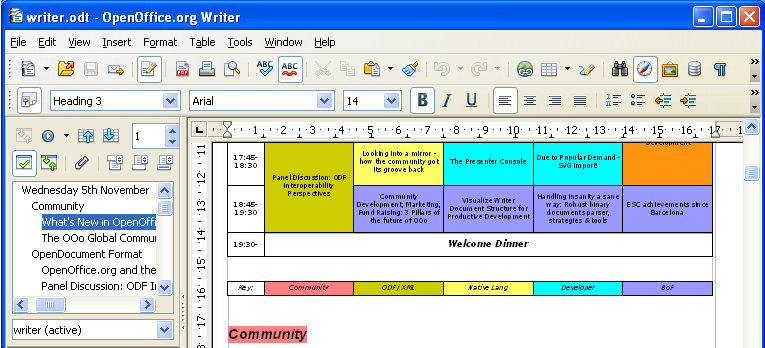
open-office.png

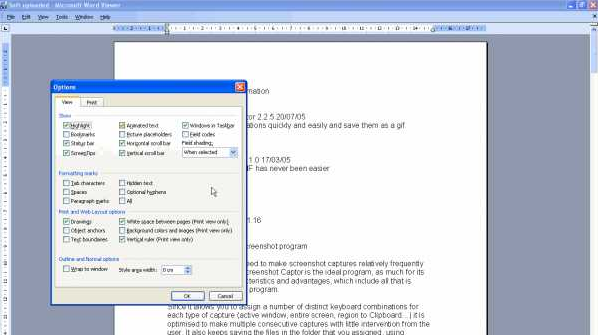
3. Microsoft Word Viewer 2007

This is a purely viewing only software offered for free by Microsoft which enables you to open Word documents but not edit them. This is fine if all you want to do is read a document but don't need to fill in any details, change it or basically edit it in any way.
microsoft-word-viewer-2003.png

Comments

  • Google all set to conquer the web &laquo; Random Thoughts on Computing Google all se<br />t to conquer

    [...] 3 free ways to open Word documents without Office [...]

    • Sent on 07 Nov 2008
  • newtronbom newtronbom

    Nice post. Clear and easy to follow. Thanks. I had forgotten about "Open Office" and am going to download it now. Cheers.

    • Sent on 08 Nov 2008
  • marzug marzug

    can u get the word viewer 2003 without installing windows? thanks

    • Sent on 09 Nov 2008
  • Nicholas Mead Nicholas Mead

    Thanks for the comments Newtronbom :) Marzug, I'm afraid Word Viewer 2003 won't work without Windows - Microsoft have to get you in somehow ;)

    • Sent on 09 Nov 2008
  • Vic Vic

    Just to let you know for mac there is also Neo Office great program as weel, like open office

    • Sent on 10 Nov 2008
  • Stephen Tredick Stephen Tredi<br />ck

    I've been using open office for about a year, and I think its great. I use it for the reason you stated in your article, to open MSoffice and other older formats. Best of all, Open Office is free.

    • Sent on 10 Nov 2008
  • Nicholas Mead Nicholas Mead

    Thanks for the tip Vic - I'll be taking a closer look at Neo Office later.

    • Sent on 11 Nov 2008
  • dixon dixon

    thanx

    • Sent on 13 Nov 2008
  • Tres formas de abrir documentos (Doc) Word sin Office (gratis) | Blog Informático Tres formas d<br />e abrir docu

    [...] Visto en ON Software [...]

    • Sent on 15 Nov 2008
  • Tres formas de abrir documentos de word sin el office &laquo; Cosas Muy Poco Importantes Tres formas d<br />e abrir docu

    [...] Cosas Muy Poco Importantes Just another WordPress.com weblog « Hackea redes Wi-Fi protegidas Tres formas de abrir documentos de word sin el office Noviembre 18, 2008 Una mayoría (para no parecer exagerado doy datos aproximados) de los documentos que se propagan en todo Internet están en formato PDF, pero, si se desea tener documentos modificables, por lo general se usa el formato de MS Word, con extensión Doc o Docx. Fuente: http://onsoftware.en.softonic.com/3-free-ways-to-open-word-documents-without-office/ [...]

    • Sent on 18 Nov 2008
  • carmine carmine

    I just wanted to thank the author for posting this information. You have no idea how much of a help this has been! I am a on deadline with a magazine to get something done tonight and my pc laptop crashed, I didn't have word on my mac and I had to open my document...it's been a nightmare. I used Google Docs and I didn't have to Download anything! THANK YOU THANK YOU THANK YOU!!!!

    • Sent on 14 Jan 2009
  • Nicholas Mead Nicholas Mead

    Glad it helped Carmine!

    • Sent on 14 Jan 2009
  • pj pj

    U saved my life! i had a paper due in today and it word would not open it! thanks to your tips now i've managed to finish it :)

    • Sent on 02 Dec 2009
  • Nicholas Mead Nicholas Mead

    Glad it helped PJ. Good luck with the paper :)

    • Sent on 02 Dec 2009
  • Abrir documentos de Word Gratis Abrir documen<br />tos de Word

    [...] Via   [...]

    • Sent on 09 Mar 2010
  • jwordspear jwordspear

    nice post very educational. More power and God bless.:-)

    • Sent on 16 Aug 2010
  • Cody Cody

    the link for word viewer does not work!?!?!?!?!?!?!?!?!?!!!

    • Sent on 22 Sep 2010
  • rent textbooks rent textbook<br />s

    Thank you for this post. My word has just expired and I needed to open some files. Now I am using open office.

    • Sent on 03 Nov 2010
  • Prakash Prakash

    Hi, Above post is really good and helped a lot to understand. Is there any other option to JUST to open Office files for reading (without installing viewer or office) on client machine? I am wondering as we can make Powerpoint application that can open without viewer/office. Most welcome for any suggestion or help in ADVANCE....

    • Sent on 16 Nov 2010
  • Dawn Dawn

    Thank you for this! Google Docs was the way to go for me.

    • Sent on 26 Jan 2011
  • Ridwan Ridwan

    Nice Tips, thanks Bro...

    • Sent on 17 Sep 2011
  • Christy Christy

    How do you open a pdf file with microsoft 2003?

    • Sent on 01 Feb 2012
  • aijaz aijaz

    hi i need this pakage

    • Sent on 17 Feb 2012
  • kiryi potom kiryi potom

    i want

    • Sent on 02 Mar 2012
  • omar dorar omar dorar

    I want download word documents without office

    • Sent on 11 Mar 2012
  • naila naila

    i also need this page,,,,plzzzz can you help mee?

    • Sent on 13 Apr 2012
  • karim lakhal karim lakhal

    sala sava labsa cgajtih

    • Sent on 15 Apr 2012
  • Comment

Softonic on Facebook