5 Mac alternatives to OneNote

By Nick Mead on 26 July, 2010


onenotelogo.pngMicrosoft OneNote is an information gathering and collaboration application that many Windows users miss when they switch to Mac. For some it may even stop them from switching they rely on it so much. Of course, you can always run it in Parallels instead but this soon becomes annoying if you use it regularly. OneNote doesn't come with Microsoft Office for Mac but the good news is there are some very good alternatives instead.

Here are 5 of the best Mac alternatives to OneNote you can try.

OmniOutliner

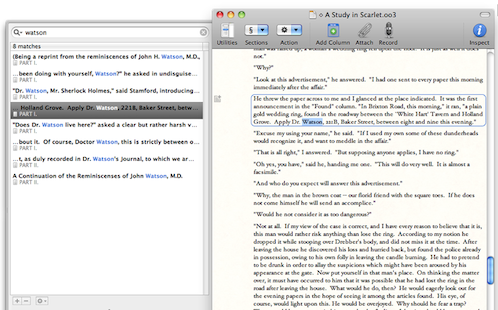
A simple and easy to use note taking application that is flexible for creating, collecting, and organizing information. It's ideal for student wanting to take-down lecture notes in a clear and organized manner or those who simply want to map their ideas and notes in a convenient way. OmniOutliner allows you to create hierarchies of main headings and sub-points that can be expanded and collapsed. This makes it ideal for brainstorming tasks, drawing-up plan of actions and mapping out ideas. However, OmniOutliner isn't limited to hierarchies - it also supports multiple columns, smart check boxes and customizable popup lists that make your notes and plans look really professional.
omnioutliner1.png


Journler

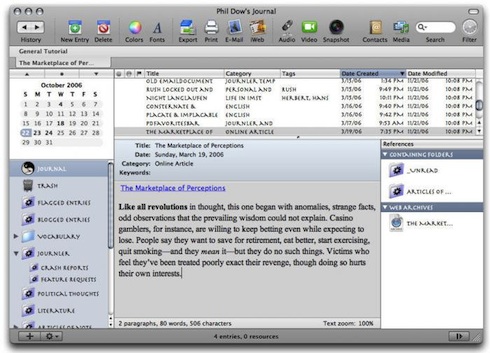
Journler is a daily notebook and entry based information manager. It will mainly appeal to scholars, teachers, students, professors, scientists that need to connect the written word with the media most important to them. Journler features iLife integration, audio and video entries, extensive document importing and instantaneous searching and filtering, plus Mail, iWeb and Address Book integration, some blog platform integration and Spotlight support.
journler2.jpg

MacJournal

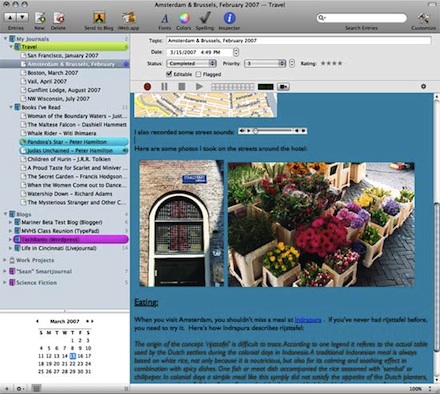
MacJournal started life as a simple diary entry application but now its a fully featured note taker and organizer that provides a decent alternative to OneNote. MacJournal organizes all your important information and helps chronicle your life faster and easier than ever before. MacJournal allows users to add any kind of content, PDFs, QuickTime movies, images, text and has most recently been updated with Smart Journals which allows specific criteria to be searched upon. The handy thing about MacJournal is that it even allows you to blog video to blogs on Blogger, WordPress, LiveJournal, MobileMe and more - ideal if you need to share your notes with others.
macjournal.jpg

Evernote

The big plus of Evernote is that not only does it offer almost everything that OneNote does, but it also allows you to sync your data and notes over multiple devices including mobiles. EverNote is a simple application that allows you to copy and paste anything onto a clipboard that can handle almost everything you throw at it. This includes everything from simple text, to photos taken on your iPhone. If you see something you'd like to keep or read later, simple select it and then go to the EverNote icon in your toolbar and select "Paste to Evernote". The only slight drawback is that you can't add attachments to Evernote.

evernote2red.png

Circus Ponies Notebook

This is probably a last resort option as it is rather limited compared to OneNote but if you only need the most basic of note taking apps, the bizarrely named Circus Ponies Notebook might be of interest. Using a simple organizational tool such as Circus Ponies NoteBook can help you keep on top of tasks through a simple and easy to use notebook format. As you enter entries into NoteBook, much as you would in a real notebook, you can clip memos, add an attachment, check it or add flags to remind you when it's due.

Circus Ponies NoteBook uses a system patented by the developer called "Multidex" which makes it easy to view all of your to do tasks in a glance. You can view them all in one go, separately, by category or by importance. You're encouraged at all times to give context to your notes so that they mean a bit more than just "complete project assignment". However, you'll probably find it very inflexible compared to OneNote with how it will let you place items on a page.


circus.png

Comments

  • Creek Jots ~ 2010-10-08 Creek Jots ~ <br />2010-10-08

    [...] 5 Mac alternatives to OneNote (onsoftware.en.softonic.com) [...]

    • Sent on 08 Oct 2010
  • Adam Norman Adam Norman

    You can add attachments to Evernote. You may not be able to add them to the free version, but you certainly can add them to the paid version. You also forgot to mention that Evernote works on Macs and PCs and syncs between them. It's awesome.

    • Sent on 23 Nov 2010
  • anonymous anonymous

    Scrivener is really great too! Perfect for longer works or just lecture notes http://www.literatureandlatte.com/scrivener.php

    • Sent on 10 Dec 2010
  • zizo zizo

    evernote sucks... i was able to attach even 100mb file in onenote. I had many files like that. it is very bad that microsoft didn't put this useful program to mac office.

    • Sent on 11 Dec 2010
  • Katrina Paquin Katrina Paqui<br />n

    I completely agree - I would pay a little extra to have OneNote since it's what I use on my PC and ebook.

    • Sent on 06 Jan 2011
  • DeadMan DeadMan

    I don't think that any of these are a good alternative from what I am seeing. One thing that I have seen is that you can use word on mac like a note book. Only problem with that is even thought the pages are as long as you want they are not as wide as you want. Also it is not as easy to have tables and everything else.

    • Sent on 16 Jan 2011
  • Suzette LaVallée Suzette LaVal<br />lée

    There's a great program that's nearly identical to (perhaps better) than OneNote. I just switched from PC to Mac and OneNote, on which I'm terribly dependent. That is Growly Notes, by Growly Bird Software.

    • Sent on 17 Jan 2011
  • quantum flux quantum flux

    Evernote isn't perfect but its probably as good as you can get. Still a far cry from One Note for anyone serious though. On a side note, I googled "growly" mentioned about and all I see it cheesy web marketing tactics BS like padding forums and posting "articles" on pseudo info sites (the new improved version of parker sites)... Bleh

    • Sent on 18 Jan 2011
  • Chris Mason Chris Mason

    You can find Growly Notes at www.growlybird.com. We're just getting started so it will be hard to find us with a search engine. No marketing BS, and the software is free.

    • Sent on 20 Jan 2011
  • Michael Clancy Michael Clanc<br />y

    Well, the link to Evernote did not work for me. Yes, its the one program that prevents me from going iMac at this stage because I use OneNote on a daily basis.

    • Sent on 23 Jan 2011
  • Ashley Ashley

    I am absolutely addicted to Onenote, and when I found out you can't get it for Mac, I was nothing short of ticked. I have tried Evernote, CircusPonies, Zengobi and the Journaler. Nothing has come even close except for this last one I tried - GrowlyNotes from growlybird.com and the best part is it's free! Now it isn't as "pretty" as OneNote and not quite as user friendly (although it's much closer than any of the rest!) but it works just the same - you can write ideas anywhere and move them around, add tables, pictures, links, etc. So far, it's my top pick!

    • Sent on 24 Jan 2011
  • Nicky G Nicky G

    Growly notes has almost the same funtionality of one note and its free. www.growlybird.com, before growlynotes i wouldnt have gotten a mac.

    • Sent on 05 Feb 2011
  • Growlynotes hater Growlynotes h<br />ater

    Look out....it's a growlynotes hijack! Growlynotes, Growlynotes, Growlynotes......

    • Sent on 05 Feb 2011
  • Not a stupid consumer Not a stupid <br />consumer

    When I see something that looks like its being touted by people with a vested interest.... I make a mental NOTE to avoid that product at all costs. Why? Because its the most dishonest and despicable marketing tactic there is. It insults consumers intelligence, misrepresents the product and damages the company's reputation. Even intended plausible comments ring as cheesy when someone tries to falsely promote a product.

    • Sent on 09 Feb 2011
  • Jim VF Jim VF

    Thanks for the tip - Growly is very much like OneNote! (No vested interest in anything but being organized).

    • Sent on 11 Feb 2011
  • Growly Notes lover Growly Notes <br />lover

    What's insulting is somebody saying that because I like a product and write a comment, I have a vested interest. I think it should be respected that each of us can make up our own mind without feeling that our intelligence is being called into question. I'm curious though as to how one does promote a product without telling people about it. Personally, I love Growly Notes and use it all of the time. I suggest looking at it and making up your own mind.

    • Sent on 14 Feb 2011
  • Scott Scott

    Gotta say that I normally avoid products that appear to be promoted through forum/comment padding, but figured it was worth a shot because none of the other listed apps are working the way I want them to. Growly Notes superficially resembles OneNote, but a little more candy-like. I haven't started using it, yet, but it seems to have some of the stuff I like about OneNote: tagging; separate notebooks; topic/page/item links; etc. What it doesn't have is coordination with your email client (I used Outlook w/ OneNote as my main business tool on any given day). Again, this is just after launching it and cruising through the UI. As a side note, I love Evernote for personal stuff, and use Scrivener for actual writing projects (presentations & books). Neither of these is useful to me in the office, so I'm keeping an eye out.

    • Sent on 14 Feb 2011
  • Douglas Douglas

    Having scoured the net for a OneNote alternative in the several years since my PC to Mac migration, I have found nothing that captures the feel and essence of OneNote like Growly Notes. Admittedly, it is still emerging and lacks some functionality. But for an initial offering, at a great price (free), I am impressed. If Chris continues development of this product I see great potential for a true OneNote replacement.

    • Sent on 15 Feb 2011
  • Levi Levi

    I'm surprised nobody mentioned Curio. It's the closest thing I found to OneNote. Growly Notes looks interesting. I'll take it for a ride.

    • Sent on 17 Feb 2011
  • Louise Rohde Louise Rohde

    The only problem about growly notes is that you don't have the palette (the thing with the headings and such), i miss that..

    • Sent on 24 Feb 2011
  • Mark Mark

    I vote for Curio. The latest version (7) gives me virtually all the functionality I was missing from OneNote.

    • Sent on 26 Mar 2011
  • cris cris

    Don't have a mac yet, but considering it. Does OneNote Web application work (Microsoft Live)?

    • Sent on 28 Mar 2011
  • Nick Mead Nick Mead

    @Cris, The OneNote web application should indeed work on Mac like every other Microsoft Live web app. However, it will lack some of the functionality of the standalone app. Note that it is already available for iPad, iPhone and iPod Touch and probably won't be long before they eventually launch a Mac version. As for switching to Mac, I say go for it. You won't regret it and you can always use a virtual environment such as Parallels for your few remaining Windows needs.

    • Sent on 29 Mar 2011
  • Alex Alex

    I have macbook pro but installed windows for 3 years ago because of onenote :(

    • Sent on 11 Apr 2011
  • Kay Kay

    I don't know if someone commented on this yet, but Evernote does have the capability now of adding attachments.

    • Sent on 17 Jun 2011
  • Yves Beriault Yves Beriault

    I'm considering switching from Windows to Mac but I'm not interested in installing Win 7 on a Mac so I can have the same benefits as before. I use Jot+Notes from Kingstairs on my PC. A gem! For now I have the impression that Mac users have to cope with second hand software, a far cry from what you'll find available for Window users. Plus, the look of the note taking software for macs that I've seen up to now seemed poorly designed. Not sure anymore of switching. But the aluminum casing is nice...

    • Sent on 01 Dec 2011
  • Ardentra Ardentra

    Hey NoteTaker is so much cheaper than Circus Ponies Notebook, and its much more convenient too.

    • Sent on 05 Dec 2011
  • ocbizlaw ocbizlaw

    I tried Growly Notes as a substitute for OneNote. The problem is that you can't create multiple levels of subsections. I loved OneNote because I could have create a client notebook then create a tab for "Motions" or "Discovery" etc. with unlimited subsections within each section. For example, I'd have a tab for each client, a subsections for motions then subsections under that with each of the myriad motions that would arise in the case and subsections under that for the motion, the opposition, the reply, etc.

    Growly Notes falls far short because you can create one main tab and one level of subsections.

    • Sent on 23 Dec 2011
  • Comment

Softonic on Facebook