
Imagine the scene. You’re just about to settle down to a film on your PC but because it’s in a foreign language, you need subtitles. You spend the next half and hour searching the internet for the right subtitle files only to find that everything you try either doesn’t work or is badly out of sync. In the end, you’re too tired and frustrated to bother watching it anymore so you go to bed and curse the subtitle world.
If this scenario is familiar to you then you should try ALLPlayer which has the best support for subtitles in any media player I’ve tried. ALLPlayer is a refreshing change as far as media players go because it not only automatically retrieves film subtitles based on the movie file’s title but it can even “speak” the subtitles back to you – albeit in voice that sounds rather like Robocop. ALLPlayer uses the excellent database at opensubtitles.org to match your file name with the appropriate subtitles meaning it does the searching for you.
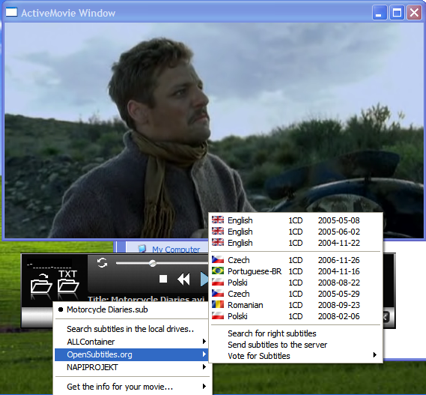
OK, the results are not always perfect and sometimes it doesn’t find anything at all but it’s a darn sight more efficient than going on a wild goose chase for them yourself. It retrieves the subtitles in no more than a few seconds, downloads them to your film folder and you can activate them immediately.
ALLPlayer also handles subtitles differently from most average players. Using something called “IQ text” it can detect the length of a phrase of sentence and make sure that the subtitles are kept on screen long enough for you to read them. Unless you’ve only just started learning a language however, and can’t read very quickly, this soon becomes annoying as the subtitles appear to be out of sync all the time.
Although there are skins available through the LiveUpdate feature (which also supposedly updates the codecs for you although the database doesn’t always work), AllPlayer doesn’t feel quite as slick as something simpler like BSPlayer but this can be forgiven for the subtitle features. Some other more basic features yoo – such as full screen mode – are not as obvious as they should be either. Nevertheless, ALLPlayer is an excellent choice for all those that rely on using subtitles with their films.
