Zimly and TuneWiki are two of the top Android music players on Softonic. I’ve reviewed them both, and I gave them an identical – and very respectable – 8 out of 10. If you’re trying to choose between them, though, I guess it doesn’t make your job that easy! In an attempt to make it a little simpler to choose, I’m going to run through both of them, briefly concentrating on what each does best.

As appearance goes, both are pretty similar – dark and sleek. In tests, however, Zimly seemed better integrated and a little slicker, and didn’t seem to have as many bugs. It also has a feature that allows you to reorder the app’s tabs, which means that player options can be organized according to your own personal tastes.
In terms of ease of use, Zimly came out on top again. It supports swipe gestures to change songs, and all the usual options – shuffle, repeat, main menu, etc. – are available on the song interface, rather than having to delve into a menu. The fact that some of these options appear over the album artwork, however, can make them a little difficult to see, which could push some users towards the unambiguous menu options of TuneWiki. Another excellent Zimly feature is the ability to fully exit the app from the interface, allowing you to easily save system resources and battery power.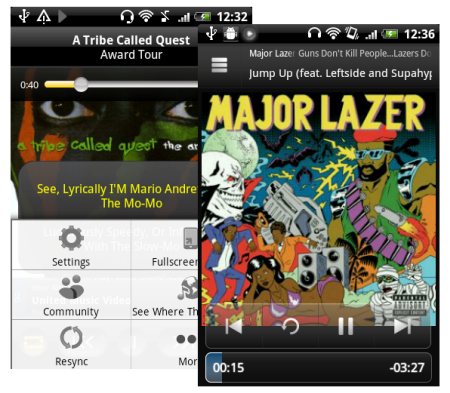
Zimly also takes the lead when it comes to configuration settings. By hitting the settings icon on the homescreen, you’ll find a wealth of little features and tricks that make using it a real pleasure. There are lockscreen controls (not available with TuneWiki), Facebook and Twitter integration, headset and headphone controls and even a multitude of alarm options.
When it comes to other features, however, the distinction isn’t so clear. While its not so hot on ease of use, TuneWiki is the uncontested champ of social integration and lyrics. It is fully YouTube integrated and has an active online community. You can link up your Last.fm account, and it has cool geolocation features and the ability to “blip” the song you are listening to your friends by SMS or email.
Another distinctive TuneWiki feature is the lyrics element – where possible, the app will find and display the lyrics to your song. You can also resync them if they aren’t quite in time. Unfortunately, you can’t add manually add lyrics that the app can’t find.
The verdict? Both Zimly and TuneWiki are great apps that deserve their high rating. When you have to pick just one, however, Zimly is the better all-rounder. If lyrics and social integration are your thing, though, you can’t go wrong with TuneWiki!