The iPad’s reputation as a serious music making tool is growing fast. Several accomplished artists including Gorillaz and Bjork have already produced albums using the Apple tablet, and its prestige within the music world is on the rise.
When the iPad was first launched, many digital music makers were a little disappointed by the product, bemoaning its lack of input/output ports and closed storage capabilities, among other things. While many of these problems still exist, it’s becoming ever -more viable to create great sounding music on the iPad, and especially the iPad 2.

The influx of great software, and to a lesser extent, hardware, has made it possible for musical innovators to get some awesome sounds out of the iPad. If you’re a musician on a budget it could be the best way to make an album without breaking the bank (Gorillaz spent just over $100 on the 21 apps the band used on its album).
If you want to be creating storming tracks in the way these guys have, here’s a run-down of the most accomplished iPad music creation apps available. I’ve included a YouTube video for each one so you can get an idea of the kind of sounds you could be creating.
iElectribe
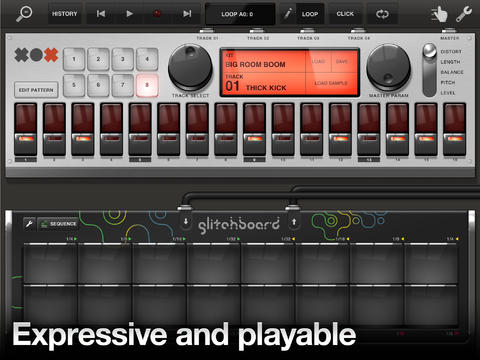
If you’re looking for old school beats for your dance music tracks, iElectribe is a highly capable tool for the job. Based around Korg’s Electribe series of rhythm synthesizers, the application offers various pre-set patterns and templates. These can be tinkered with to create some quite elaborate beats.
For those who need a bit more control, iElectribe boasts 64 user banks that have just a single trigger on the downbeat of each measure. There are eight basic sounds to play around with and knobs for altering pitch and waveforms. Price: $19.99
miniSynth Pro
Another analog-style synthesizer for iPad, miniSynth Pro is an accomplished two-oscillator FM/subtractive hybrid polysynth. Among its features are a dynamic waveform selection algorithm, individually parameterized voice processing and a dual dedicated arpeggiator module.
miniSynth Pro for iPad boasts a five-destination LFO (low-frequency oscillator), dual envelopes, settable glide and old school stereo reverb. All this adds up to make the app a powerful beat maker that won’t hurt your pocket. Price: $9.99
Korg iMS-20
This full translation of Korg’s classic MS-20 analog synthesizer works incredibly well on the iPad. The original Kong synth was a dual-oscillator monophonic affair with multiple routing and filtering capabilities. You don't need to understand that to have fun with this though!
You get all that with Korg iMS-20, along with an analog sequencer, a drum machine (based on MS-20 patches), a drum step sequencer, a virtual keyboard, two virtual kaoss pads, plus a mixer. It comes at quite a price, but it’s still great value for a piece of software that so accurately replicates that amazing fat sound of the MS-20. Price: $32.99
Electrify
Electrify is a fun virtual groove box for iPad that lets you edit tracks and create loops on the fly. The eight-track sequencer has a series of editable parameters, meaning that you can get really creative. The very neat and clear interface allows you to easily make some great sounds, making it ideal for live performances.
Electrify comes with a bunch of samples, or you can import your own. There’s a clip matrix that allows you to work with your samples in a really original way, producing some innovative sounds. Price: $14.99
AmpliTube (with iRig)
Something of a revelation when it was launched, AmpliTube is an app that combines with a hardware adaptor called the iRig to offer a digital amplifier in your pocket. Whether you’re connecting a guitar, bass, or keyboard, AmpliTube is designed to offer the power of a traditional amp on your Apple tablet.
AmpliTube comes with five virtual amplifiers, each offering a different sound (loosely based around the different amplification tones by Marshall, Fender and Mesa/Boogie). There are 11 different stompbox effects, including delay, fuzz, wah, flanger and phaser. There’s a built-in recorder and basic production studio as well as a SpeedTrainer tool for practicing. Price: $19.99 for AmpliTube Full, $39.99 for iRig adaptor
touchAble
If you’re an Ableton Live user and you have an iPad then you'd be a fool not to check out touchAble. This innovative app is a remote controller for Ableton Live, with six modules for manipulating the music making suite wirelessly.
touchAble gives you access to the Clip Grid, Mixer, Devices, Keys, Pads and XYZ-Pad from your Apple device, adding a raft of slick new ways to control Ableton Live. The app doesn’t require any MIDI mappings and it uses Live OSC to communicate directly with the Abletton Live API. Price: $24.99 (Ableton Live 8 from $349)
Looptastic HD
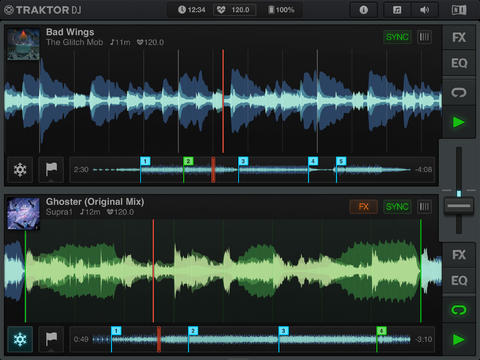
Looking for a dead simple music creation tool for your iPad? Looptastic HD is one of the most straightforward you’ll get. Through its neat drag-and-drop interface you can arrange loops to create your own original music.The app comes bundled with lots of loop sets of differing genres, including trance, hip hop, dubstep, breakbeat and progressive house.
Looptastic HD includes a built-in ‘Loop Store’ where you can choose from hundreds of free loops. You can also record your own loops using the built-in microphone or headset.
It lacks the features that many professional DJs might hanker for but there are a few realtime effects thrown in, as well as a triple zone mixer and a scratch strip for dropping a loop from anywhere in the waveform. Price: $14.99
Aurora Sound Studio HD
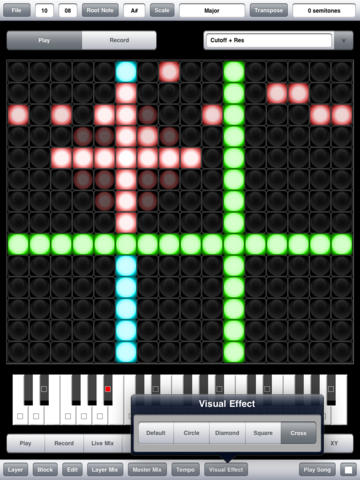
Dubbed by Future Music magazine as “the best music making app to come out so far”, Aurora Sound Studio HD is a beast of an application that serves both professionals and beginners alike. It’s billed by its developer as “pattern-based musical sequencing software”, meaning that you choose a musical scale and every note you play is in perfect tune.
The list of features in Aurora Sound Studio is worthy of many expensive desktop-based music making programs. It includes 14 instrument tracks, four independent engines (drum, analog synth, pad synth and sampler), 32 patterns per song, and the ability to chain together up to 199 patterns in Song mode. Best of all, Aurora Sound Studio is gorgeously implemented, offering a smooth interface for creating beautiful music on your iPad. Price: $39.99
GarageBand
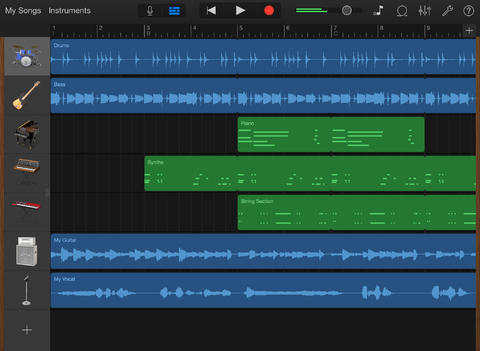
Apple’s own music creation software has been a big hit on the Mac platform, and now it’s available for iPad too. GarageBand for iPad is perfect for non-musicians because it does so much of the hard work for you.
The app includes Smart Instruments (including piano, bass, guitar and drums) that help you play flawlessly without missing beats or going out of tune. The editing section is very clear and easy to master, allowing you to mix up-to eight tracks using the virtual instruments, loops and your own audio recordings.
GarageBand for iPad has some audio input capabilities that let you record directly from a microphone or connect an electric guitar, playing through classic amps and stompbox effects. Price: $4.99

Farewell to Android
Klout is FarmVille for grown-ups
Does Flash matter on mobile?
What is Twitter?
These Apps for the apple iPad 2 sound great! Can't wait to try out the Garage Band and work on my Stompbox" target="_blank">http://www.guitareffectsplus.com/">Stompbox skills.