
With the recent release of the Golden Master version, it looks like Lion will be officially released either this week or next. Before rushing into upgrading though, take a deep breath and consider some of the following to ensure you have no nasty surprises:
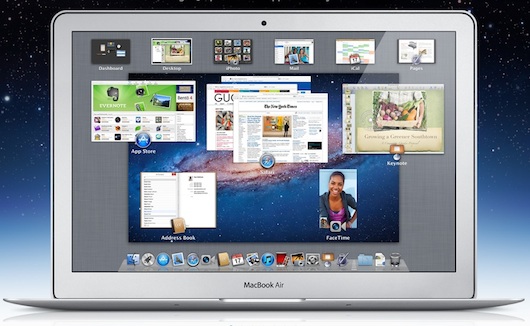
- Lion will only upgrade if you're running OS X 10.6.8.
- Your processor must be an Intel Core 2 Duo, Core i3, Core i5, Core i7 or Xeon CPU.
- You must have at least 2GB of RAM.
If you're unsure about these 3 basic requirements, click on the Apple logo in the top left of your screen and select About This Mac:
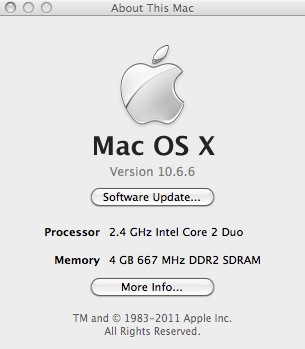
If all of the above are correct then consider the following:
- Obtain an Apple ID. If you're an iTunes user, you'll already have one but if not, you'll have to create one because for the first time, Apple are releasing a new operating system via the net i.e. The Mac App Store.
- Have a credit card ready. Lion costs $29.99. If you don't have a credit card, you can use an iTunes gift voucher. Note that Apple Gift cards will not work in The Mac App Store.
- Make sure you have at least 8GB of free hard drive space. If you're need to clean some space but can't quite identify which files are taking-up so much room, try DaisyDisk or OmniDiskSweeper (which is now free).
- Backup your hard drive. If something should go wrong with the installation of Lion, it's essential that you have a backup of your data. Time Machine comes free with OS X and is ideal for this or alternatively, Super Duper! is another excellent backup tool.
- Lion doesn't support PPC Macs so Rosetta Apps won't work with it. If you're running older versions (usually 5 years or more old) of any of the following and can't afford to upgrade them to an Intel version, don't install Lion just yet as they either won't work or you will experience problems with them: Creative Suite, Quicken 2007, Microsoft Office 2008, Rosetta Stone Language Software, Freehand and Appleworks. For a breakdown of which major apps are and aren't compatible with Lion, check here.
- Have some updated Printer Drivers handy. Since some older printer drivers require Rosetta to work, you may find that your printer doesn't work with Lion. You should be able to find updated drivers on the developer website although if the printer is really old, you'll be out of luck.
- Be extra cautious if you use Apple Mail or Aperture. Both applications are particularly sensitive to OS changes as was illustrated with Mail when Snow Leopard arrived. It may be worth waiting at least a few weeks before upgrading to Lion if you rely on either or both and can't afford to waste time re-configuring them.
- Throw away your Magic Mouse and buy a Magic Trackpad (about $69). Well, you don't have to throw away your Magic Mouse but you'll probably feel like it if you've ever used a Magic Trackpad. Lion has been optimized to be more like using an iPhone so you'll miss out on many gesture features if you don't have a Magic Trackpad although it's not essential.
If you are concerned about teething issues when upgrading, the best single piece of advice is simply wait! Most of the problems with Snow Leopard were ironed-out within a month-or-so of the release and so if you're not desperate to have Lion on your Mac immediately, take it easy.
There are bound to be issues that arise after upgrading, so if you discover any when Lion is released, let us know in the comments below!
Farewell to Android
Klout is FarmVille for grown-ups
Does Flash matter on mobile?
What is Twitter?
Seems I'm fucked. I'm PPC, with Apps that that are not compatible with Lion. Having supported Macs for 26 years via 'The Performers,' perhaps its time to move to pastures new; where loyalty is rewarded above it's position on the DOW index. Sad Sad Sad !
2GB of Ram kills me. Looks like I'll have to go buy some of that too. >:-(
I have 4 Gig! That's plenty. Really excited about Apple's OS launch tomorrow.
Richard, If you're running an PPC then stick with Leopard. Apple is about making a great computing experience, not supporting every a-hole with a g4 they purchased on ebay Bush's first administation.
@Richard, The switch to Intel has been going on for the past 5 years so you've had plenty of warning. However, I can understand the perspective of long-term Mac users like yourself. Surely it can't have been that difficult for Apple to have added Rosetta support to Lion like they did with Snow Leopard? @trayNTP, I can't imagine how anyone can survive on 1GB of RAM anyway! If you are going to upgrade, bear in mind that it's considerably cheaper buying RAM from dealers other than Apple ;)
@Dingo, The latest rumors are that Lion will be released "within days" not tomorrow. Do you know something we don't? ;)
@Tony - I don't think it's reasonable to throw personal insults around just because someone has an older computer than you. Please try to be nice. [Blog admin]
am running on Mac os x10.6.8 MacBook Pro 7,1 i think it's compatible with Lion, but the worry now is that am running on office 2008 from Preston university hope it will not disturb, and another challenge is i don't know whether i can buy online via Bank coz am in Zambia now and we have no apple stores here.
kindly advice
thanks
Peter Mudenda, Office 2008 will still work on Lion but with problems. According to one poster on this forum, it seems that Word and PowerPoint will work but Excel and Entourage will not. As regards upgrading to Lion, you don't need an Apple store. You can upgrade via the Mac App Store online as long as you have a credit or debit card.
at least or equal to 2 gigs of ram ?
The consumer electronics company that is Apple today is much different than the innovative computer company it once was. Richard is correct in that the Apple Corporation does sincerely only care about the bottom line. Selling devices without cameras or 3G or whatever step-backward they are on now is simply to entice you to buy more of the same product. iPad 2 is different from iPad 1 how? But alas, new users will not remember the promise Apple had made many years ago that they will always provide backwards compatibility. They ditched that with a press release some time ago. But anyway, it doesn't matter. You can get better products for less money if you can live without the little bitten apple engraved on your property. Apple is the screen in their 1984 and no longer the hammer. They suck!
@Jason H, With mobiles at least, it does seem that many users are deciding "they can live without the little bitten apple engraved on your property" as you say with Android leaving iOS behind. No sign of Mac sales going down yet but it will be interesting to see what happens when Google OS is released ;)
@Tony, There's only one a-hole I've seen on this thread so far, and that's the one who calls someone that because he likes to insult older guys with older computers. You're a twirp, kid.
I've had a Mac in one form or another for 22 years. I don't expect my 6 year-old Mac to run the newest operating system. Today, there were more people in the Apple Store at Pentagon City than the rest of the mall combined. They must be doing something right. Steve Jobs has led them from near extinction to the most valuable company in the world. They get 2.5 times the price for their products versus the pc/android world. They were 20% of the entire GDP increase in the retail sector last quarter. iPads are 97% of the tablet market. These are all facts. And yes, they're not perfect. You can whine, bitch, and complain all you want but I'm sticking with Apple.
I've had nothing but trouble connecting on my Comcast Home page since I installed Lion. I can't open nothing on my home page ,when I click on something ,it don't work. My advice DON'T install Lion at this time.Even a Comcast Tech could'nt help me.
installed Lion after the 3GB download late last night. Worked well until opening the three Apps that are built to integrate with Google, this being Mail, iCal and iChat. It seems to have migrated account settings from OS 10.6.8 without any problems, but I couldn't get the accounts to work correctly. For example; 1. iCal couldn't logon to my google account to update my calendar. It kept reverting back to calendar events I had on the calendar prior to the upgrade. It also kept creating new CalDAV accounts with my Google account detail, one after the other, until I had 12 of them, all trying to logon to and sync with my google account, and all of them returning error messages stating that the password was incorrect.
2. Another odd thing happened with Mail. I couldn't personalize any settings such as the view or even change my signature. It kept coming back with a error message regarding permissions and library preferences folder. The actual mail account was working fine though. Sent and recieved without any problems.
3. Now for the desktop...Also couldn't change what icons and apps was displayed in the dock, nor could I remove anything. I could remove it now, but once I rebooted, the dock would revert back to what it contained prior to the reboot. Even the wall paper would revert back after a reboot.
The strange part its that the machine kept reverting settings and personalizations such as wallpapers and even brightness settings of the screen to what it had been prior to the upgrade. It's almost like the machine had been deep frozen! So, now reinstalled 10.6.8 and I will wait for the bug fixes.
All I do is web browse and email. I'm happy with snow leopard and afraid of messing things up, one, and, two, having to learn all those new ways of doing things. MUST I move to Lion? Ever?
@Jacques Janse Van Rensburg, Thanks for letting us know about your experiences. I'll look into some solutions for these problems.
24th July Update: Please note that some new issues have been discovered now that Lion has been released. Most important is that there are some issues with Office 2011 which makes Communicator crash amongst other things. It also doesn't support the Auto-Save feature that's new to Lion. There are also reports of problematic WiFi connections and general slowness with various applications. These bugs will no doubt be ironed-out in time but if you rely on Office 2011 and especially Communicator, consider waiting before you upgrade.
Hi,
I wrote the following above. I'm really asking! I'll appreciate any wisdom on the topic. Thanks.
"All I do is web browse and email. I'm happy with snow leopard and afraid of messing things up, one, and, two, having to learn all those new ways of doing things. MUST I move to Lion? Ever?"
@Frank If all you do online is browse and use e-mail then it really doesn't matter what operating system you are uisng but in your case, I would stick with Snow Leopard for now until you're ready to use a Trackpad and explore OS X a bit further.
26 July Update: Microsoft have released a page detailing problems that users may encounter when using Office 2008 and 2011 in Lion. Adobe have also got a similar page for all Adobe issues with Lion.
Get Lion......... its going to make you SICK...... Why does my Apple Bluetooth mouse run the wrong way now? Where have all my 20 years of correspondence gone to? Where have all my artwork files disappeared too? Why does Windows & Adobe application not work? Is my iPhone broke? Why does my WiFi not work anymore?
Cruel Bast---ds Apple are tricksters building my hopes up with promises of £20.99's worth of up grades operating system that does nothing special it doesn't even supported software that I have been running for years perfectly & used daily to get through life........ anybody feel the same. whats the best price PC around? Whats the best Android phone going? Me I wish I still had OSX Snow Leopard
@PhilFuller, Sorry to hear about your problems. I hope you backed-up before upgrading! Based on the various issues raised in this thread, it's probably a good idea to install Lion on an external drive (which is very simple) to begin with before installing it on your hard drive.
If anyone is having major problems and wants to easily downgrade to Snow Leopard from Lion, check out our guide here: http://onsoftware.en.softonic.com/how-to-downgrade-from-lion-to-snow-leopard
do i really need it ?
dfd
dat's not bad!
I've installed Lion two weeks ago. I'm still discovering little secrets and I must sway I'm totally satisfied. I din not experience any problems, but I do own a pretty new MacBook (bought in May!) .... What's wrong with innovation? If you really use your computer, especially if it's a lap top, you are bound to change it eventually. Of course if you have a performa computer you won't be able to update the system, but if you can actually still use such a vintage machine, it means you do not need innovations so bad, so why complaining?
@Elizabeth -- I second that!
of course, yes you r so right..