How to: Create a custom template for your Facebook profile

By Elena Santos on 16 December, 2010

With the new profile design rolled out by Facebook a few weeks ago, pictures have become specially relevant. The top image bar that displays thumbnails for the images you're tagged in can be easily tweaked to match your main profile picture and create a more original Facebook profile.
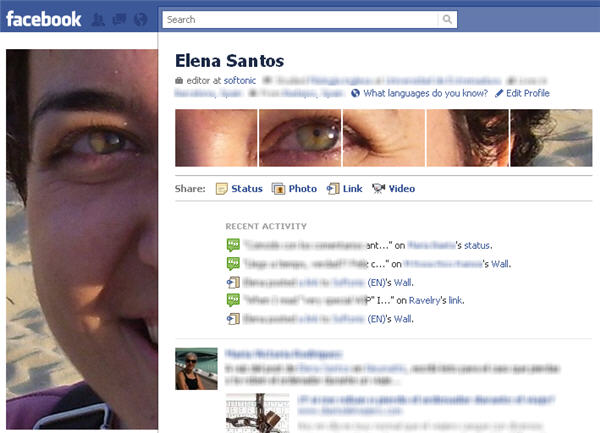
If you want to do something similar in your Facebook profile, just follow these steps:

1. First, download and open the Photoshop template provided by Digital Inspiration, the blog where I learnt about this trick. Then open a picture of yourself that's 700 pixels wide and 500 pixels high. Copy and paste this picture onto the PSD file. You may need to adjust the picture so that it fits the small thumbnails once it's cropped.

2. Go to File > Save for web and Photoshop will save all the picture slices as standalone JPG files in a folder.

3. Now log on to your Facebook profile page and upload the largest image (the 200 x 500 one) plus the five 100 x 68 thumbnails generated by Photoshop to your Profile Pictures album.

4. Here comes the tricky part: first, make sure the large image is selected as your main profile picture. Then, tag with your name the remaining five thumbnails, starting by the one that should appear furthest to the right, and ending by the one that should be displayed on the left end, beside the main picture.

5. Done! Your custom Facebook profile is finished. Of course, you can also follow this tutorial with any other graphic editor and not just Photoshop. Simply slice your picture manually following the sizes indicated in the PSD template: 200 x 500 pixels for the main image, and 100 x 68 pixels for each of the five thumbnails.

Comments

  • heigilr2010 heigilr2010

    Below you'll find a video of unboxing CrunchGear headphones Monster Beat by Dr <a href="http://www.monsterheadphoneonsale.com/" target="_blank"><strong><em>beats by dr.dre</em></strong></a>. Dre. The headphones come with a red audio cable, and a customized cable iSoniTalk<a href="http://www.monsterheadphoneonsale.com/" target="_blank"><strong><em> dr dre headphones</em></strong></a>, which has a microphone<a href="http://www.monsterheadphoneonsale.com/" target="_blank"><strong><em> bose in-ear headphones</em></strong></a>. Both cable persnickety fit the original iPhone's headphone port<a href="http://www.monsterheadphoneonsale.com/" target="_blank"><strong><em> Monster beats</em></strong></a>. We are getting a couple of them in the 'soon <a href="http://www.monsterheadphoneonsale.com/" target="_blank"><strong><em>monster headphones</em></strong></a>,' according to our PR <a href="http://www.monsterheadphoneonsale.com/" target="_blank"><strong><em>repbose headphones</em></strong></a>, so be on the lookout for our no-holds-barred review coming sometime between next week and the end of the internet<a href="http://www.monsterheadphoneonsale.com/" target="_blank"><strong><em> bose earphones</em></strong></a> .

    • Sent on 24 Dec 2010
  • Robert Rendler Robert Rendle<br />r

    Super Program

    • Sent on 03 Jan 2011
  • Jen Jen

    Why the heck did a pic of Barac Obama come up when I opened the file????

    • Sent on 07 Jan 2011
  • Elena Elena

    Jen: because it's the pic used as sample. Just remove that layer and add your own photo.

    • Sent on 25 Jan 2011
  • andy chappell andy chappell

    thank you for this article!! I love my new profile thanks to you Elena <3 <3

    • Sent on 27 Jan 2011
  • ali ali

    thanks,

    • Sent on 07 Feb 2012
  • jonathan jonathan

    what if someone else tags a pic of me and posts it, then the custom made profile pic will go one step to the right and the pic tagged in come to the first left....???

    • Sent on 23 Feb 2012
  • Comment

Softonic on Facebook