How to: Install Windows 7 on an eeePC 1000H

By Tom Clarke on 10 February, 2009

This morning, I installed and set up Windows 7 on my ASUS 1000H netbook. It wasn't exactly difficult to do, but given that gathered a few strands of information from a few different sources, I thought I'd share the whole process with my fellow 1000H users, and anyone else who might be interested in the latest version of Windows.
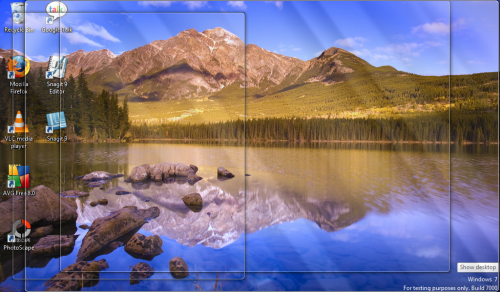
windows-7-1000h-2.png

I'll start off with a list of the downloads you'll need to get everything up and running, but you can also download a special ZIP file I've made for this post, which also includes installers for Firefox, Adobe Flash, AVG and various other utilities I consider to be essential in a fresh install.

What you will need

  • Asus eeePC 1000H (mine has RAM upgraded to 2GB)
  • Windows 7 Beta disk (get this from Microsoft here)
  • USB DVD drive (installing from a flash drive may be possible)
  • Fixed ACPI drivers (download here)
  • Ralink wifi driver for Vista (download here)
  • Intel graphics driver for Vista (download here)
  • ASUS SuperHybridEngine (download here)
  • Or just download this ZIP file which includes all of the above drivers, as well as various other handy utilities

Step one - preparing the 1000H for Windows 7

I had two partitions on my 1000H: one for Windows XP Home (default OEM install) and one for Mac OS 10.5.5. Installing Windows 7 will overwrite your Windows XP partition, but it won't affect your OS X installation... much (more on that later). As with any OS installation, the first thing I did on my 1000H was back up any photos, documents etc, on either my Windows or OS X partitions, just in case.

Once you're sure that you're ready to go, connect your DVD drive via USB and restart your 1000H. It's impossible to upgrade directly from Windows XP at the moment, though this will probably change with the retail version of Windows 7.

Step two - installing from the Windows 7 DVD

Once you restart your 1000H, make hit F2 to enter your BIOS settings and ensure that you have the CD/DVD drive selected as your preferred boot device, then boot into the DVD. When you see the welcome window, select your locale and keyboard preferences (interestingly, these settings didn't stick for me: I had to configure the Spanish keyboard on my 1000H once Windows 7 was up and running). Next, hit Install now and you're required to accept the terms and conditions of the Beta.

Next up, you're asked if you want to upgrade or perform a custom (brand new) installation. At this point, you can select Upgrade, even if you had XP Home installed before. The installer should spot your existing installation after a few seconds and will display the standard warning that your old files and apps will be moved to a Windows.0 folder. Personally, I usually back up the things I need and delete this folder as it often takes up a lot of space on the HDD.

Now just let the installer run. When I did it, the whole installation only took about 20 minutes. Don't forget to keep your Windows 7 product key handy in order to complete the install.

Step three - updating the drivers & installing utilities
windows-7-1000h-1.png

Once Windows 7 is up and running, you'll need to install the ACPI,  wireless and graphics drivers. Set the Intel graphics driver to use Vista compatibility mode or otherwise it won't run properly. You may need to restart your 1000H a couple of times during this step.

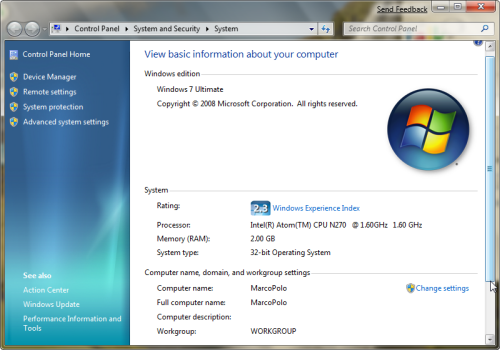
The ASUS SuperHybridEngine works fine in Windows 7, as do the ASUS hotkeys controlling volume, brightness and so on. Once everything was set up, I tested the Windows Experience Index and got a score of 2.3, which really isn't that bad for a lightweight notebook.

Final observations

In all, Windows 7 runs very well on my 1000H, and the user interface and response times seem better than on XP. Boot takes 32 seconds, which is a good 17 seconds faster than Mac OS 10.5.5 on the same machine. Windows 7 doesn't feel too buggy, so far, so it's great to see that Microsoft have finally come up with a decent successor to XP. It's definitely a recommended upgrade.

The Windows 7 bootloader did remove (or at least hide) the option to boot into OS X. To fix this, I simply ran NeoSmart EasyBCD to force it to display OS X as an option. The first time I did this, I broke the Windows bootloader too, but this was easily fixed by booting with the Windows 7 install DVD and fixing the installation.

[With thanks to: EeeUser forum]
Comments

  • Bloggliv - allt om datorer och IT &raquo; Blog Archive &raquo; Installera Windows 7 p&aring; din Asus Eee PC 1000H Bloggliv - al<br />lt om datore

    [...] 1000H och vill pröva en installation kan jag rekommendera detta inlägg och originalinlägget hos ONSoftware. Installationen verkar hur enkel som helst och allt som behövs är [...]

    • Sent on 11 Feb 2009
  • eeeFan eeeFan

    You don't mention the LAN driver. After installing Windows 7 on my 1000H the Attansic L1 LAN driver is missing and not installed by Windows Update. Have you found a working driver for this?

    • Sent on 13 Feb 2009
  • Tom Clarke Tom Clarke

    @eeeFan - you're right, I didn't mention it. To be honest, I hadn't even tried it yet as I have wifi at home and at work. Sorry about that. Have you tried to install the Vista driver?

    • Sent on 13 Feb 2009
  • whoRyder whoRyder

    Forget about Win 7, How did you install OSX on your eee??

    • Sent on 03 Mar 2009
  • Tom Clarke Tom Clarke

    @whoRyder - I used iDeneb and 10.5.5. Actually, I should probably write a guide for that too, right? ;-) In the meantime, check out these two awesome pages which I found really helpful: http://www.enik.ch/2008/10/osx-leopard-1055-on-the-eee-1000h/ http://ipis-osx.wikidot.com/installing-ideneb-1-3-1000h

    • Sent on 12 Mar 2009
  • Justin Justin

    hey i have the same problem as eeefan, i need the lan driver; can you please help me? i really need my lan so i can get back on xbox live, any help much appreciated. details on how to install drivers really helps me out, thanks a lot

    • Sent on 23 Mar 2009
  • Tobbe Tobbe

    Installing from usb-stick IS possible and very easy to do acually. For tips check out my webpage (in swedish though.. but I think you can get the hang of it). ;) Nice tutorial though. But the only reason Im here is because I need those drivers. ;) Lost my own somewhere. =)

    • Sent on 08 Apr 2009
  • ppnog ppnog

    for LAN drivers use the suplied in 1000H driver DVD

    • Sent on 13 Apr 2009
  • Charlie Alexander Charlie Alexa<br />nder

    Nice bit here - but for my setup : I have an Eeepc 1000H with Win 7 RC Built 7100. It will not run any of those drivber programs. It tells me they are for another version of Windows. FWISW The wifi and LAN worked 'out of box' so to say.

    • Sent on 27 Apr 2009
  • Jon Sebastian Jon Sebastian

    I did this,,, started without this article and finished up using several of your suggestions.... Is running beautifully. My only hope is that I can afford the upgrade when it comes out and that it won't screw up my perfect installation, as everything is operating with precision Thanks,,,,

    • Sent on 02 May 2009
  • Josiah Josiah

    After the installation to my 1000HA, my built-in webcam quit working with windows 7. Any help? Thanks!

    • Sent on 11 May 2009
  • adz144 adz144

    Windows 7 RC1 build 7100 is more stable, but i have no application to running WEB CAM and Resolution 1024 x 768 is not available any more. Can any body help me?

    • Sent on 16 May 2009
  • Joe Joe

    I just installed it on my 1000h! Works like a charm! I used windows ready boost to hop it up! I got 5 gig of ram! Thanks a lot! But I have one question... I couldn't get the video drivers to install. Kinda bugs me... I like playing teeworlds. If you can help me out i'd be great! Btw how long does beta work??? -- Joe

    • Sent on 18 May 2009
  • Marcelo Marcelo

    ¿Como como figuraste el teclado para que reconociera todos los caracteres?

    • Sent on 23 May 2009
  • Kristian Kristian

    i can't get it to boot from my USB DVD drive :( i change priority but it won't boot -.-

    • Sent on 31 May 2009
  • Kristian Kristian

    fixed it

    • Sent on 31 May 2009
  • Erik Erik

    While I restart my Eeepc 1000HE nothing happens when I press F2. Is there another way to make it boot from the Dvd drive? the .iso image for Win7 is on the dvd drive.

    • Sent on 03 Jul 2009
  • Ryan Ryan

    If you keep tapping the esc key when you power up you get a boot menu, select your CD/DVD drive and you are off.

    • Sent on 03 Jul 2009
  • Jennifer Jennifer

    I just loaded Windows 7, 7100 build and have a couple problems. The biggest one is the screen resolution, I finally got the eeePC Tray Utility loaded but it won't allow me to select 1024x768 (normal or compressed) and I need the compressed to use with one of my programs. My other issue is the hotkeys say they are assigned but don't work. I am open to suggestions, I've read a lot of threads on various sites but no one seems to have any answers that have worked for me. Thanks!

    • Sent on 27 Jul 2009
  • sap sap

    thankyou window id mail

    • Sent on 08 Aug 2009
  • rohan rohan

    hey thanks for the guide. i installed w7 on my eeepc 1000h, works pretty damn well, but i can't help but notice it lags a lot when streaming video's online. even when i turned off windows aero and all the fancy stuff it still felt the need to take its sweet as time. although that could be chrome's fault... that's my 2cents

    • Sent on 11 Aug 2009
  • rohan rohan

    i think i was meaning to write "arse" or "ass" time... or it could've just been "sweet as time". who knows

    • Sent on 11 Aug 2009
  • Tom Clarke Tom Clarke

    @Rohan - yeah I know what you mean regarding the video lag. Suggestion: did you install the Asus Super Hybrid Engine app which came preinstalled on your 1000H? I haven't tried it, so I don't know if it works but I'd recommend giving it a go. As to your second comment, maybe you just invented a new way of spelling 'ass'? Who knows?

    • Sent on 11 Aug 2009
  • links for 2009-08-11 &laquo; steinarcarlsen links for 200<br />9-08-11 &laq

    [...] How to: Install Windows 7 on an eeePC 1000H | OnSoftware (tags: eee) [...]

    • Sent on 11 Aug 2009
  • HITESH SANWARIYA HITESH SANWAR<br />IYA

    thanks a lot lot Tom Clarke & onsoftware.en.softonic.com too.u done a great help.

    • Sent on 13 Aug 2009
  • Windows 7 on my netbook Windows 7 on <br />my netbook

    [...] happy to report that Windows 7 works like a charm, with the only major wrinkle being that I had to reinstall the ACPI drivers along with some of the other Asus utilities to get the special function keys working as they did before. (The link there is a decent summary of [...]

    • Sent on 20 Aug 2009
  • Collie Collie

    Just installed it in my 1000H. Works as well as a custom made UE. About the LAN, i installed it with the patchcord plugged in, so it just recognised the card and installed it. Then it downloaded and installed all the drivers. The only things i had to install manually were the ACPI and the wifi. Audio, LAN, bluetooth, video, etc, she installed on her own. How i made the keys work? Just install the utility posted above. Don't uninstall anything like the readme say, just double click the MSI file, click on OK as many times as required, and then reboot. After that, press FN + 2 to turn on wifi. It will try to install, leave it install. if it doesn't, then use the installer. Any questions, feel free to email me! dust.dog@live.com Ciao!

    • Sent on 29 Aug 2009
  • Nico Nico

    In the beginning I could not get Wifi into business. ultimately proved the only reason the mac address. My router works well if I mac filtering off. best regards. Nico

    • Sent on 08 Sep 2009
  • Joker Joker

    I've heard there are problems with the soundquality when using Skype, anyone having these problems?, since it's an app i use extensively I can't afford making the switch unless its working. Thanks

    • Sent on 16 Sep 2009
  • enzo enzo

    hi for all in the forum, I recently install on my eepc-1000h the version 7600 rtm of windows 7, the system work as swiss watch but i cant get the resolution of 1024x768, I install the las version of acpi from the Asus page, and the last version of video drivers fron Intel page and I cant get the flag keys of capslock and numlock, all the other things work fine the webcam, the bluetooth and the wifi too. If somebody have an idea please post. thanks in advance.

    • Sent on 20 Sep 2009
  • dnewguy dnewguy

    does anyone know how I can use my 32GD SSD as my primary drive and my 8GB as a secondary drive for my eee pc 1000h? I want to be able to run windows 7 on my 32GB without any partition on it and then run mac os x on my 8GB. Any help would be greatly appreciated. I am not too technical so any replies in plain English would be much more helpful thanks!

    • Sent on 31 Oct 2009
  • Zoltán Zoltán

    Hi everyone! Has anyone experienced any performance issues as compared with win xp (ie. is win7 eating battery power more than xp - I've read a couple of posts around the web that complain of drastic rise in battery consumption, like xp = 6hrs; win7 = 4.5-5hrs...)?

    • Sent on 06 Nov 2009
  • sanjiv204 sanjiv204

    thanks for this tutorial and most importantly for the utility file which had all the drivers. i was very reluctant to indulge in this upgrade but now I am glad that i did.

    • Sent on 28 Nov 2009
  • Windows 7 Enterprise On A Netbook | Bui4Ever | Bui4Ever.com Windows 7 Ent<br />erprise On A

    [...] read a few online articles that there are some issues with driver support for such things as the LAN card which I think is because they were using the beta version. I actually didn’t have any [...]

    • Sent on 13 Dec 2009
  • aldie aldie

    Brethren... do you know how to restore the Hotkeys to work... I was looking for it, now... thanks before.

    • Sent on 28 Dec 2009
  • petek petek

    Anyone still having web cam issues go into the BIOS and change to "enable" - can't remember under which tab. Works fine

    • Sent on 28 Jan 2010
  • zack zack

    DOSEN'T WORK!!!!!!!!!!!!

    • Sent on 11 Feb 2010
  • cba 2 type it cba 2 type it

    I soooooooooooooo agree with zack!!

    • Sent on 11 Feb 2010
  • Penolope Q Penolope Q

    me 2 :D:D:D::D:D:D:D::D:D:D;D;D

    • Sent on 11 Feb 2010
  • MR MARSHMALLOW FACE! MR MARSHMALLO<br />W FACE!

    OMG STOP AGREENG WITH ZACK!!!!!!

    • Sent on 11 Feb 2010
  • Craig Duarte Craig Duarte

    I am trying a fresh install of Win7 Pro, I was getting the frequent ACPI message, so I downloaded the suggested driver. When attempting to install I get a message that the install was interrupted, and then it rolls back the installation, this is soooo frustrating! I have tried different versions of the ACPI driver and they ALL do this. Any ideas as to what may be interrupting the install, anybody?

    • Sent on 21 Feb 2010
  • Sander Sander

    I read that you can solve the 768x1024 resolution problem by installng the XP- vga-driver, that indeed works, however, the "Aero" won't function. Does anybody know of the existance of a new driver that also makes "Aero" work? Thx! Sander

    • Sent on 28 Feb 2010
  • JhonMarcetucci JhonMarcetucc<br />i

    try this one, http://gecko.me/?acpifix acpi driver works great on my eepc 1000h=)

    • Sent on 31 Jul 2010
  • greencoconut greencoconut

    thank's for help my Notebook.

    • Sent on 06 Sep 2010
  • Flo Flo

    Merci beaucoup pour les liens, plus particulierement pour celui de l'acpi, c'etait juste ce qu'il me fallait et que je n'arrivais pas a trouver. Encore merci et bonne continuation !!!! One French

    • Sent on 18 Sep 2010
  • kwazi kwazi

    how do i activate this win 7 ?

    • Sent on 22 Sep 2010
  • nesilika nesilika

    Thank you sooo much for ACPI :))

    • Sent on 27 Feb 2011
  • Emo Emo

    Just installed Win7x86SP1 on Old Celeron_CPU EeePC. Forget the external DVD frives, use Flash USB drive and this handy tool from MicroSoft: ISOtoUSB/DVD http://images2.store.microsoft.com/prod/clustera/framework/w7udt/1.0/en-us/Windows7-USB-DVD-tool.exe

    Works like charm.

    • Sent on 16 Mar 2011
  • Jan Jan

    Hi Tom, do you also have a guide to install MacOS X on the eee PC 1000H ?? TNX in advance

    • Sent on 14 Apr 2011
  • Comment

Softonic on Facebook